
QR Code Menu Ordering System for Restaurants and Beach Bars
Guests scan, order and pay from the table or the sunbed, and the order goes straight to the kitchen or bar.
With Quickord, the QR code on each table or sunbed opens your menu on the guest's phone. They pick what they want, send the order and, if you allow it, pay online. The order lands on the kitchen screen or printer with the table or position attached, so nobody has to walk over just to write it down.
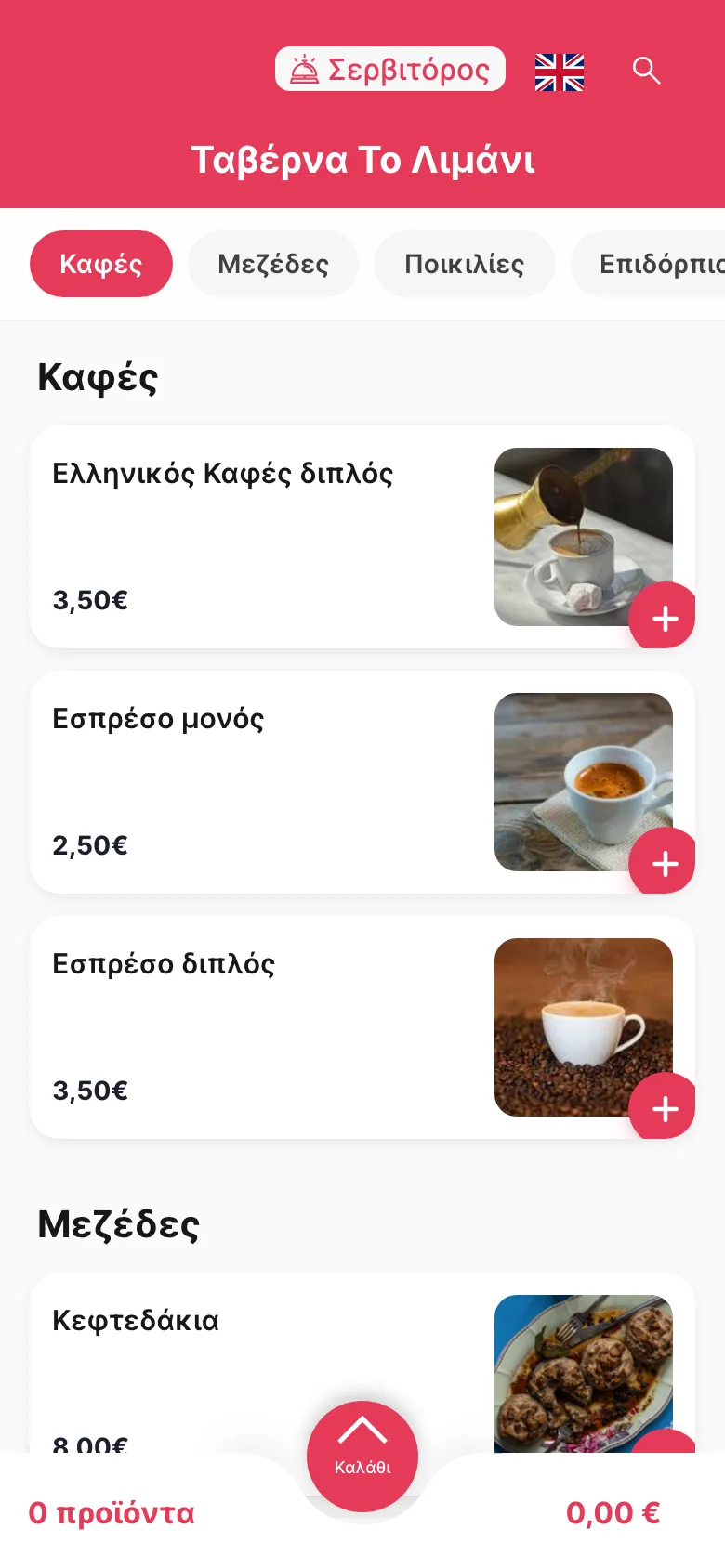
What is a QR ordering system?
A QR ordering system lets guests place their own order from their phone. They scan a QR code at the table, sunbed or counter, the menu opens in the browser, and they choose items and send the order. It goes straight into the venue's system and on to the kitchen or bar, instead of waiting for a waiter to take it down.
That's the difference from a QR menu, which only shows the menu. If all you need is a menu guests can read, start with the digital menu. If you're still deciding between the two, QR menu vs QR ordering puts them side by side.
How QR ordering works in Quickord
The same flow at a restaurant table, in a café or on a sunbed by the sea.
- 1
Scan the code
Each table, sunbed or umbrella has its own QR code. The guest scans it with the phone camera and your menu opens in the browser, with no app to install.
- 2
Choose from the menu
Photos, descriptions and allergens show up in the guest's language. Anything you've marked as sold out appears that way straight away.
- 3
Send the order and pay
The guest sends the order and, if you've switched it on, pays online by card from the phone. Otherwise they pay the waiter or at the till. You decide which options they see.
- 4
Prepare and serve
The order appears on the kitchen or bar screen, or prints, with the table or the zone and position. Staff see where each order stands and take it to the right seat.
Where venues use QR ordering
The idea is the same everywhere: guests order from where they're sitting. What changes is the space you're serving.
Restaurant tables
Guests order from the table and can call a waiter with one tap. Your waiters keep taking orders on the waiter app, and both reach the kitchen the same way.
QR ordering for restaurantsBeach bars and sunbeds
Every sunbed or umbrella gets its own code, and orders are grouped by zone, such as beach, pool or restaurant, so the runner knows exactly where to go.
QR ordering for beach barsCafés and fast food
Customers scan at the table and order without queuing at the counter. If you also run a self-ordering kiosk, its orders join the same kitchen flow.
QR ordering for fast foodWhat changes during service
Nothing to download
The menu opens in the phone's browser on any smartphone. Guests who'd rather not use their phone can still order from a waiter.
No retyping
Orders reach the kitchen screen or printer exactly as the guest placed them, so nobody copies them out by hand.
Payment your way
Online payment from the phone, payment to the waiter, or both. You set it, and you can change it any time from your settings.
A waiter when they want one
One tap on the QR page tells your staff a table needs someone, without anyone waving across the room.
The menu in their language
Quickord picks up the language of the guest's phone and shows the menu in it, which matters a lot in tourist areas.
One queue with waiter orders
QR orders and orders taken on the waiter app land on the same screen, so the kitchen isn't following two lists.
QR menu, kiosk or QR ordering?
QR ordering is one of the ways guests can order for themselves. These pages cover the options around it.
Digital menu
Build and update the menu your guests see, with photos, allergens and translations.
QR menu vs QR ordering
Which one fits your venue, and when it makes sense to move from one to the other.
Self-ordering kiosk
A touchscreen where customers order, pay and get a receipt without waiting for staff.
Restaurant ordering system
Table service, takeaway and delivery in one system, with QR orders arriving next to the ones your staff take.
Frequently asked questions
What is a QR code menu ordering system?
It's software that lets guests scan a QR code at their table or sunbed, see the menu on their phone and send their order directly to the venue. In Quickord the order goes straight to the kitchen or bar and into the same system as the rest of your orders.
Do guests need to download an app?
No. The QR code opens the menu in the phone's browser, so it works on any smartphone without installing anything.
Can guests pay from their phone?
Yes, if you want them to. Quickord supports online card payment from the guest's phone. You can also keep payment with the waiter or at the till, or offer both.
What's the difference between a QR menu and QR ordering?
With a QR menu, guests read the menu on their phone and a waiter still takes the order. With QR ordering they also choose items and send the order themselves, and it goes straight to the kitchen or bar.
How do QR orders reach the kitchen?
As soon as they're sent, QR orders appear on the kitchen display (KDS) or print on the kitchen printer, with the table, or the zone and position for sunbeds. They can also show up on the waiter's app.
Does QR ordering replace my waiters?
No. Waiters keep taking orders on the waiter app alongside QR orders, and guests can call one over from the QR page. What goes away is the walk to a sunbed just to write down two waters.
What happens when something sells out?
Mark it as unavailable in Quickord and the menu behind every QR code updates straight away. You don't need to reprint the codes.
See QR ordering set up for your venue
Tell us how your tables or sunbeds are laid out and we'll show you how ordering and payment would work there.
Book a demoQuickord guides
Read more about day-to-day operations
Practical articles for planning and applying this workflow in your business.
QR Ordering for Beach Bars: A Practical Setup Guide
How beach bars can use QR ordering to reduce queues, serve large areas and keep menu availability accurate throughout a busy summer day.
Read the guideDigital OrderingDigital Ordering: How Restaurants Build a Better Order Journey
Why QR ordering and self-service kiosks are operational tools rather than trends, with a practical framework for restaurants planning adoption.
Read the guideMenu OptimisationMultilingual Digital Menus for Restaurants in Tourist Areas
How to build a multilingual menu that helps international guests understand dishes, allergens and options without adding pressure to the service team.
Read the guideRelated Quickord solutions
Connect this workflow with the tools and business setups that support the rest of your operation.