
Delivery Order Management Software for Restaurants
Phone, website and platform orders in one flow, from the first ring to the customer's door.
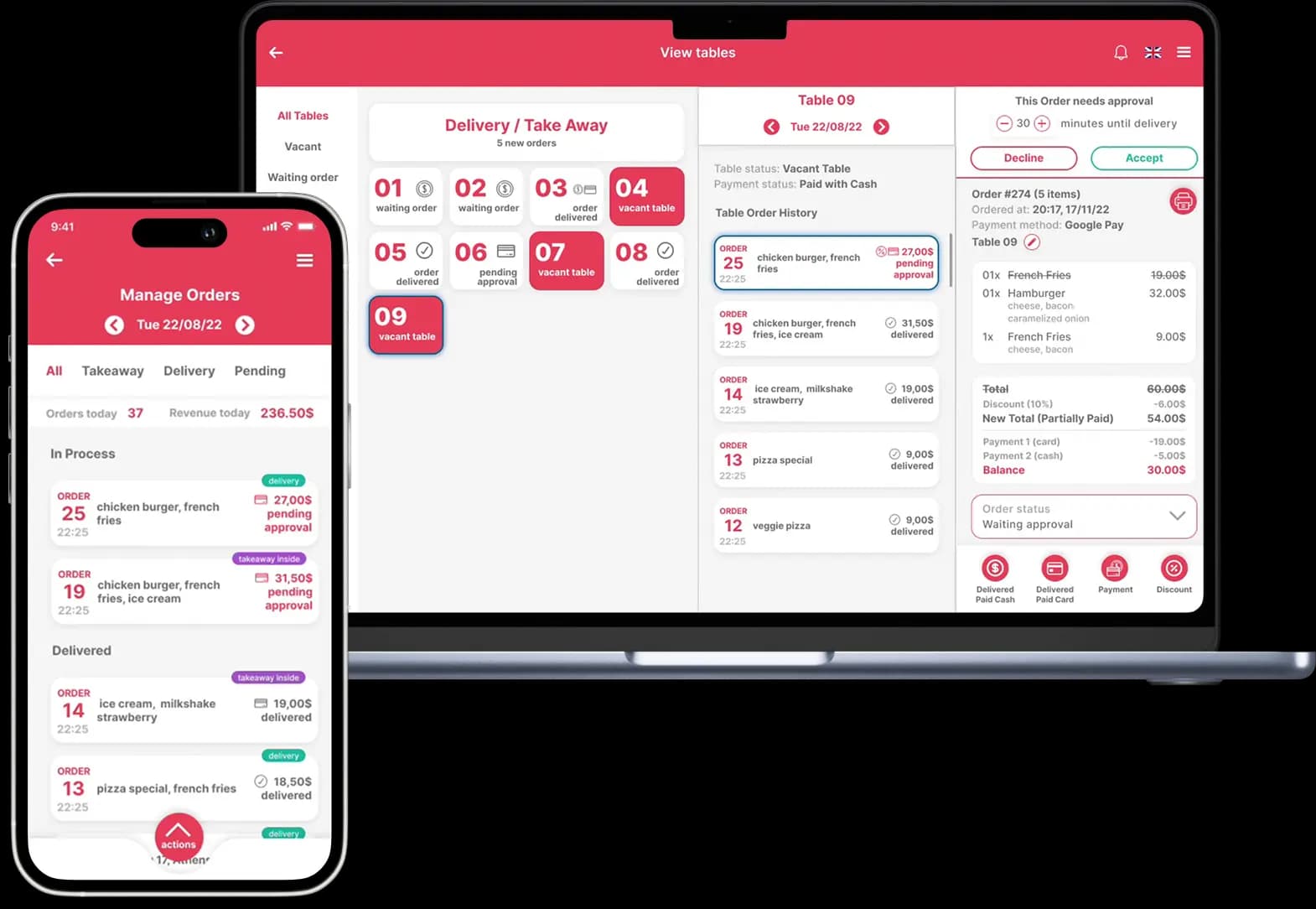
Quickord takes every delivery order, whichever channel it comes from, sends it to the kitchen without retyping and keeps its status visible until it's delivered. You see the whole delivery workload on one screen instead of a tablet per platform and a notepad by the phone.
What is a delivery order management system?
A delivery order management system is software that collects the delivery orders from every channel a restaurant uses, such as phone calls, its own website or app and platforms like efood, Wolt and BOX, into one queue. From there the team accepts each order, sends it to the kitchen, hands it over for delivery and can see what stage it is at until it reaches the customer.
If you've been looking for a delivery POS, this is the part of Quickord that does that job. It isn't a separate app: delivery runs in the same system as your tables, takeaway, stock and reports.
Where your delivery orders come from
Most restaurants that run their own delivery take orders from at least three places. Quickord puts them in the same list.
Phone orders
With call detection, the caller's name, delivery address and past orders appear on screen as the phone rings. The address fills in on its own instead of being typed from memory.
Call detectionYour own website or app
Customers order for delivery from your own ordering page or app, and the order goes straight into Quickord with the kitchen updated automatically.
Ordering systemefood, Wolt and BOX
Platform orders are imported automatically into the same list, and each one shows which platform it came from.
efood, Wolt and BOX integrationFrom order to doorstep, step by step
The same four steps for every delivery order, whatever the channel.
- 1
Take the order
Every delivery order lands in one list. You accept or decline it and set how many minutes until delivery.
- 2
Send it to the kitchen
The order reaches the kitchen screen or prints automatically, with items, extras and notes exactly as the customer placed them. Nobody retypes it.
- 3
Send it out
When it's ready it goes out with your driver. No driver free, or no drivers at all? Request a Wolt courier with Wolt Drive in one click from inside Quickord.
- 4
Track it until delivered
Each order shows where it is, from new and in preparation to on its way and delivered, so whoever answers the phone can tell a customer where their food is. With Wolt Drive you also follow the courier live.
What changes in a busy delivery shift
One list instead of several devices
Staff watch one order list, not a tablet per platform and a notebook for phone orders.
No retyping, fewer mistakes
Orders reach the kitchen as they were placed, so quantities, extras and addresses don't change along the way.
The right address from the first call
Call detection brings the customer details up on screen, which cuts down on wrong or incomplete addresses.
The whole workload at a glance
You see what's coming in and what's being prepared across every channel, so you know when the delivery time you quote is realistic.
Delivery in the same reports
Delivery platform orders feed the same statistics as dine-in and takeaway, so you can compare channels side by side.
Stock that keeps up
With stock management switched on, every delivery order updates your inventory like any other sale.
Looking for one specific part?
This page covers the whole delivery flow. These pages go deeper into each piece of it.
efood, Wolt and BOX integration
How the platforms connect to Quickord and how their orders are imported.
Wolt Drive
Deliver your own orders with Wolt couriers when you don't have a driver available.
Call detection
Customer details, address and order history on screen as soon as the phone rings.
Restaurant ordering system
Tables, takeaway and in-store orders in the same system as your delivery.
Frequently asked questions
What is delivery order management software?
It's software that gathers delivery orders from the phone, your own website or app and delivery platforms into one queue, then helps you accept them, send them to the kitchen, hand them over for delivery and see what stage each one is at. In Quickord it runs inside the same system as the rest of your ordering.
Can I manage phone orders and platform orders together?
Yes. Phone orders taken with call detection, orders from your own website or app and efood, Wolt and BOX orders all appear in the same list, each marked with its source.
Do I need my own drivers?
Not necessarily. If you have drivers, orders go out with them as usual. If you don't, or they're all out, Wolt Drive lets you request a Wolt courier from inside Quickord. Availability depends on the areas Wolt covers.
Is this the same as the efood, Wolt and BOX integration?
The integration is one part of it: it brings platform orders into Quickord. Delivery order management is the whole flow around those orders and your phone and web orders, from accepting them to the kitchen, dispatch and tracking.
Does delivery show up in my reports?
Yes. Orders from delivery platforms are included in Quickord's statistics together with the rest of your sales, so you get one picture of the business and can compare channels.
Who sets it up?
The Quickord team handles the connection and setup of the integrations you choose, and helps you shape the workflow around the way your shop works.
See your delivery flow in Quickord
Tell us which channels you take delivery orders from and we'll show you how they would run in one system.
Book a demoQuickord guides
Read more about day-to-day operations
Practical articles for planning and applying this workflow in your business.
efood, Wolt and BOX in One Screen: Organising Delivery Orders
A guide for restaurants managing efood, Wolt and BOX orders through one queue, with cleaner menus, less manual entry and better peak-hour control.
Read the guideRestaurant OperationsPeak-Hour Restaurant Orders: How to Reduce Errors Under Pressure
A practical order-management workflow for busy restaurants and cafés, covering channels, modifiers, kitchen visibility, staff roles and daily review.
Read the guideRestaurant OperationsSummer Peak Season: How to Keep Restaurant Orders Moving
A practical guide for restaurants, beach bars and cafés handling summer demand: faster service, fewer order errors and a calmer peak-hour workflow.
Read the guideRelated Quickord solutions
Connect this workflow with the tools and business setups that support the rest of your operation.